Node.js 26 LTS upgrade planning starts with one date: October 28, 2026, when version 26.13.0, codenamed Lithium, moved the 26.x line into Long Term Support. If your team still runs Node 22 or 24, this post gives you the move in order: what breaks, what Temporal changes, and how to audit every runtime before you switch.
TL;DR
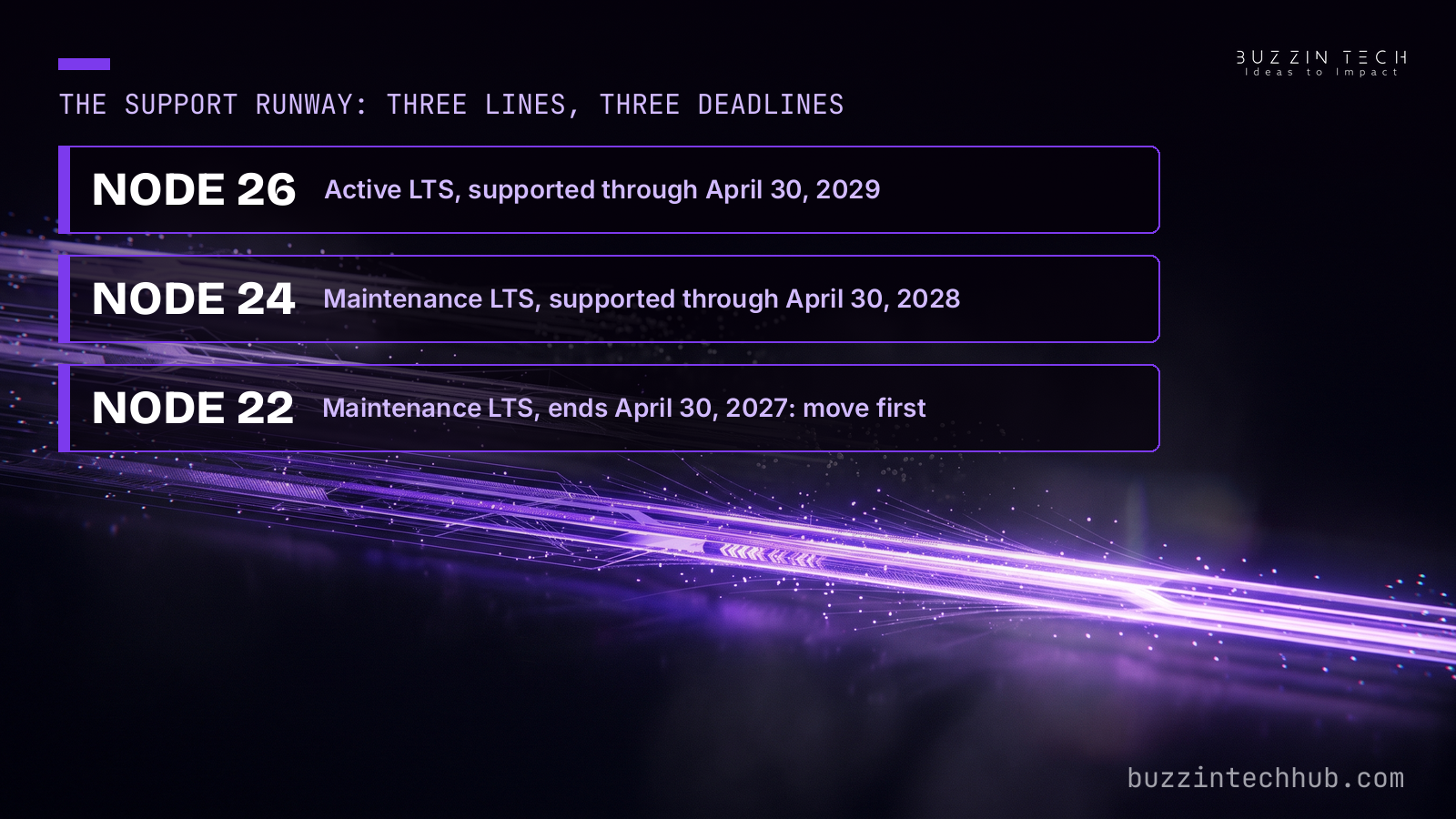
- Node 26.13.0 (October 28, 2026) is the Active LTS line, supported through April 30, 2029.
- Node 22 ends April 30, 2027; Node 24 runs until April 30, 2028.
- Breakage sits in removed APIs and old dependencies: writeHeader, legacy stream imports, native addons.
- Temporal is on by default: immutable, time-zone-aware date types, no flag, no polyfill.
- Audit every runtime: Docker images, CI pins, hosted projects, self-hosted tools.
What changed on October 28
Version 26.13.0 is a status release, not a feature release. The release notes say that other than updating metadata, such as the process.release object, no further changes from 26.12.1 are included. Code that ran cleanly on 26.12.1 behaves the same on 26.13.0. What changes is the support promise behind it.
That promise is what makes 26 the target. The project's release schedule lists each line's status, and the Node.js page on endoflife.date tracks the same dates. Our web development team treats runtime upgrades as maintenance with a deadline, not as optional chores, because an unsupported runtime stops receiving security fixes while it still serves traffic. The support table below is the whole reason to move, and it is worth reading before any code change.
| Runtime line | Status now | Support ends |
|---|---|---|
| Node 26, Lithium | Active LTS since October 28, 2026 | April 30, 2029 |
| Node 24, Krypton | Maintenance LTS since October 20, 2026 | April 30, 2028 |
| Node 22, Jod | Maintenance LTS | April 30, 2027 |
| Node 20 | End of life since April 30, 2026 | No fixes |
| Node 25 | Odd-numbered line, unsupported | No fixes |
Two conclusions follow. Teams on 22 have about six months of support left, so the move belongs on this quarter's plan. Teams on 24 can wait, since Maintenance still means security fixes, but new projects should start on 26. Moving from 22 to 24 now would buy one year and then demand the same work again.
One more date matters for planning. The October security releases (22.23.4, 24.22.1, and 26.12.1) already carry the month's ten CVE fixes, so landing on 26.13.0 lands on the patched line. That is the full security story here: this post is about the upgrade, and our PHP security update post already covers the patch-week discipline in depth.
What Node 26 gives you in return
Temporal is the change application code will notice first. It is enabled by default in Node 26, with no flag and no polyfill. Temporal replaces hand-rolled Date arithmetic with immutable, time-zone-aware types, and it removes a whole class of silent date bugs: month indexing, daylight saving shifts, and string parsing that behaves differently across environments.
A typical before-and-after looks like this. Old code adds days to a Date and hopes the time zone survives. New code states the intent:
const now = Temporal.Now.zonedDateTimeISO("Asia/Karachi");
const renewal = now.add({ days: 30 });
Temporal does not remove Date, and it does not force a rewrite. It gives new code a better default and gives old code a migration path, one function at a time. Date libraries still work, but many codebases will find they need less of them.
Underneath, V8 moves to 14.6, taken from Chromium 146, which adds Map.prototype.getOrInsert and getOrInsertComputed, plus Iterator.concat. Undici 8 becomes the HTTP layer behind the built-in fetch, and npm ships at 11.20.0 on the 26.12 line. None of these change your API surface on their own. Together they are the reason to retest outbound HTTP and any code that leans on engine edge cases, rather than assuming a version bump is free.
What breaks on the way up
Most applications will pass with no changes. The breakage concentrates in old code and older dependencies, which is why the checklist below starts with searches, not rewrites. Run each search across your own code and across node_modules, because a dependency three levels deep is the usual source of the failure.
http.ServerResponse.prototype.writeHeader()is removed. UsewriteHead(). The old name was an undocumented alias, but old middleware and old tutorials still call it.- The six legacy stream internals are removed:
_stream_wrap,_stream_readable,_stream_writable,_stream_duplex,_stream_transform, and_stream_passthrough. Import fromnode:streaminstead. Packages that import these directly will throw the first time that code path runs. - The
--experimental-transform-typesflag is removed. Plain type stripping for TypeScript still works, but if you relied on the flag for enums, namespaces, or decorators, use a real compiler or build tool instead. module.register()is now runtime-deprecated and prints a warning. The replacement ismodule.registerHooks(), available since 23.5.0 and 22.15.0, so you can migrate before you upgrade.- Decrypting AES-GCM with a tag shorter than 16 bytes now needs an explicit
authTagLength. Short tags without it will fail. - Native addons must be rebuilt. The native module version moves to 147, so prebuilt binaries from an older line will not load. If a native dependency has no maintained build for 26, that dependency is your blocker, and you should know that before upgrade day.
- Teams coming from 22 also inherit what Node 25 removed: bundled Corepack, the
fs.F_OKand related constants, SlowBuffer, and default Web Storage globals. LocalStorage also behaves differently with no storage file configured: it returns undefined instead of quietly keeping data in memory, which can affect tests. - Since Node 25, the official Linux binaries link against libatomic, which some distributions need as a separate install. Building from source now needs GCC 13.2 or newer.
If your searches come back empty and your native dependencies publish builds for 26, the upgrade is a test run, not a project. If they do not, the failing dependency sets your timeline, not the release calendar.
The audit: find every Node you run
The laptop is the least of it. Production Node hides in places nobody lists, and an unlisted runtime is the one that breaks after a deploy. Write the list down before you change anything.
Start with the obvious: .nvmrc files, Dockerfiles and their base image tags, and the Node version in every CI matrix. Then check the places teams forget. A self-hosted n8n instance runs its own Node. A Next.js server runs the Node its host provides. A staging server that mirrors production runs its own version too, and a vendor app on your stack may run one more.
Hosted platforms deserve their own line on the list. Vercel made Node.js 26 LTS generally available on October 29, 2026, and it is the default for new projects. Existing projects auto-upgrade on their next deploy if engines.node in package.json allows 26, for example with a range like >=20. A pinned project moves by setting engines.node to 26.x and redeploying, and prebuilt deployments need Vercel CLI 65.8.0 or newer. An unpinned deploy can land on 26 without anyone deciding to upgrade, which is exactly why the audit comes before the move.
Two more checks belong on the same page. First, confirm every pin agrees: .nvmrc, the Docker image tag, the CI matrix, and engines should all name the same line, or the next deploy will surprise someone. Second, note every runtime whose owner is unclear. If nobody owns a server, nobody will test it, and that server should be first on the upgrade list, not last.
The upgrade sequence that works
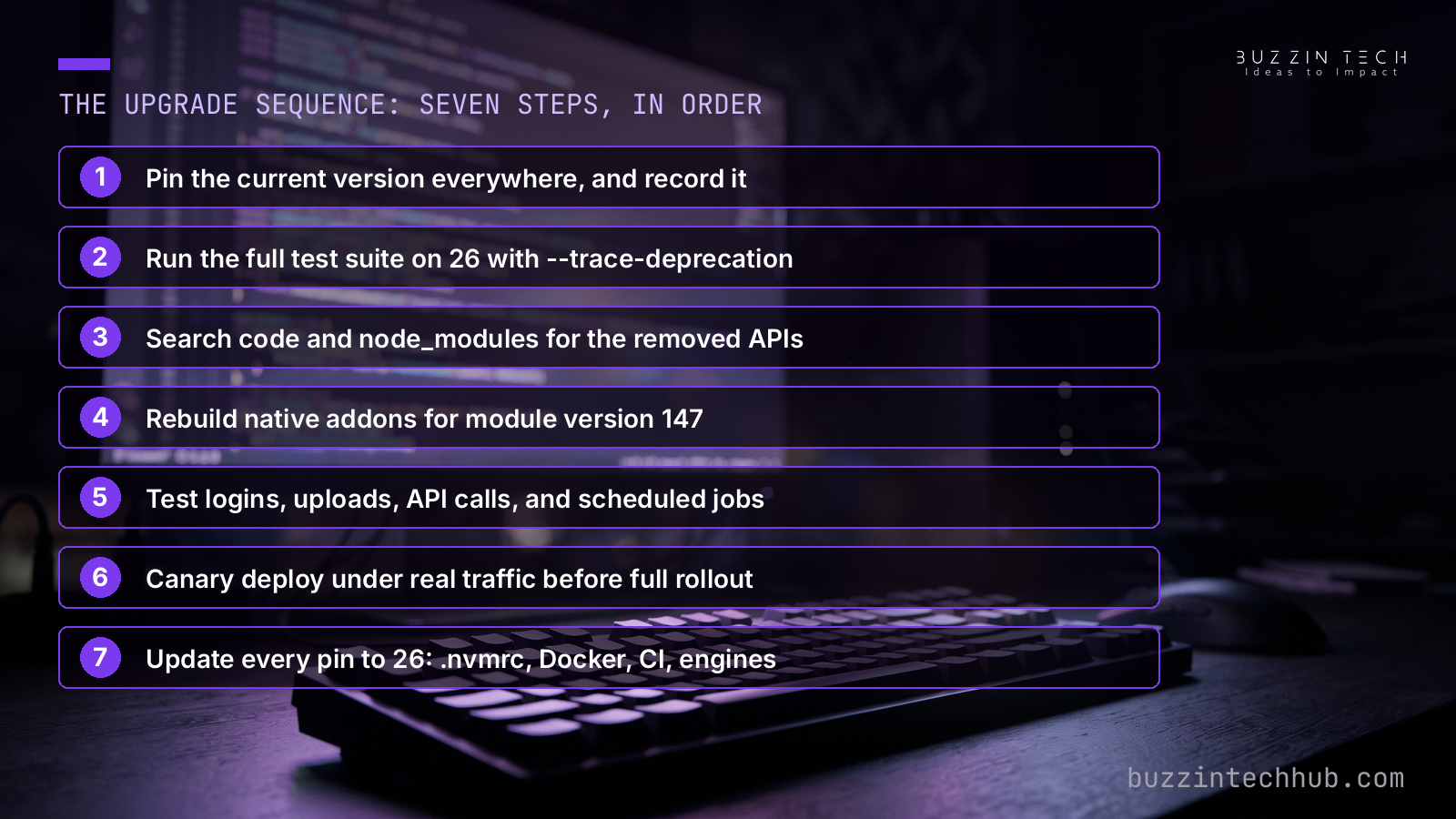
Upgrade in staging first, with the same data shapes and the same traffic paths production sees. The sequence below is the order we use on client builds, and each step has a pass condition before the next one starts.
First, pin the current version everywhere and record it. You need a known-good state to return to, and you need the list from the audit to know what "everywhere" means. Second, run the full test suite on 26 with --trace-deprecation enabled, and read the warnings instead of clearing them. A deprecation warning today is a removal in the next line.
Third, run the searches from the breakage checklist and fix or replace what they find. Fourth, rebuild native addons and confirm each one loads on 26. Fifth, test the paths a runtime change touches first: logins, file uploads, outbound API calls, scheduled jobs, and payment callbacks. A green unit suite does not prove those paths work.
Sixth, deploy to a canary or a single instance and watch it under real traffic before rolling the rest. Watch error rates and outbound HTTP behavior closely, since Undici 8 changes the fetch layer: Vercel's own changelog notes that built-in fetch now negotiates HTTP/2, with multiple requests sharing a connection, and offers VERCEL_FETCH_DISABLE_H2=1 plus a redeploy as the opt-out for Functions if HTTP/2 causes trouble. Seventh, update every pin to 26 once the canary holds: .nvmrc, Docker tags, CI matrix, and engines ranges, so the next deploy reproduces the tested state instead of drifting back.
If a step fails, stop at that step. A failed native rebuild or a failing payment callback is a decision point, not a reason to push harder. Fix the dependency, or hold that service on 24 while the rest moves, and write down the date you will revisit it. A service held on 24 with a written revisit date is a plan. A service held on 24 because nobody checked is a surprise waiting for April 2028.
The last even-number upgrade
Node 26 is the last release under the old twice-a-year, odd-even schedule, and that changes how teams should think about versions. For eleven years, "use the even-numbered version" was correct advice, because only even lines became LTS and odd lines expired after six months. After October 2026, that rule stops working.
From Node 27 onward, the project ships one major release a year, each April, and every release becomes LTS the following October, after a six-month Alpha phase. Node 27's Alpha phase began in October 2026, with stable 27.0.0 planned for April 2027, LTS in October 2027, and end of life in April 2030. Do not run 27 in production: it is alpha, and alpha is for testing, not traffic.
The practical result is simpler planning. Instead of asking which even number is current, teams keep one annual upgrade on the calendar: test the April release, move to it when it reaches LTS in October, and retire the old line before its support ends. The version number matters less than the habit. A team that upgrades every October, on a tested path, will never again discover its runtime is six months from end of life with no plan.
That habit is also the maintenance case for hiring help. Runtime audits, pin agreement across Docker and CI, native addon rebuilds, and an annual upgrade calendar are the kind of work that quietly prevents incidents, and it fits the same four steps we use on every project in our case study list: Discovery and Architecture, Design and Prototyping, Engineering and Build, Deployment and Scaling. The upgrade itself is a day's work. The audit and the calendar are what keep it a day's work every year after.
Should you move now, or wait?
New projects should start on 26. Teams on 22 should move this quarter, because April 30, 2027 is close enough that a delayed start becomes a rushed finish. Teams on 24 with a clean dependency list can move now and gain the longer runway to April 2029. Teams on 24 with a blocked dependency or no test window this quarter can stay, with a written date to revisit, and lose nothing: Maintenance still delivers security fixes until April 2028.
What no team should do is drift. An unpinned deploy, an unlisted server, or a version chosen by default is not a decision, and defaults changed on October 28. Check what you run this week, run the searches, and put the move on the calendar with a named owner. The upgrade is straightforward. Finding every runtime is the work, and it is work worth doing before the next LTS date arrives.
Move your stack to Node 26 without breaking production
If your team runs Node 22 or 24 and the audit list is longer than expected, we can run the upgrade for you: every runtime found, every dependency checked, native addons rebuilt, and the canary deploy watched before the full rollout. See how we handle web development and maintenance.
Frequently asked questions
Is Node.js 26 LTS now? Yes. Version 26.13.0, codenamed Lithium, moved the 26.x line into Active LTS on October 28, 2026. It is the line the project recommends for production, with support through April 30, 2029. The release itself changes only LTS metadata from 26.12.1, so it adds no new features, but the support promise behind it is what makes it the target.
Should teams on Node 22 move straight to 26? Yes, in most cases. Node 22 reaches end of life on April 30, 2027, while Node 26 runs to April 30, 2029. Moving to 24 first would buy about a year and then demand the same upgrade work again. The exception is a blocked native dependency with no build for 26: hold that service on a supported line, fix or replace the dependency, and move with a written date.
What actually breaks when upgrading from 22 or 24? Removed APIs break first: writeHeader is gone, the six legacy stream internals are gone, and the --experimental-transform-types flag is gone. Native addons need rebuilding for module version 147. Most breakage lives in old transitive dependencies rather than your own code, so search node_modules as well as your source, and run tests with --trace-deprecation to catch runtime deprecations early.
What does Temporal change for existing date code? Nothing, until you use it. Temporal is enabled by default in Node 26, but Date still works and no rewrite is forced. New code can use immutable, time-zone-aware types such as ZonedDateTime, which removes a class of silent bugs around month indexing and daylight saving shifts. Teams usually adopt it one function at a time, and many find they need less of their date library afterward.
Does Vercel upgrade my project to Node 26 automatically? It can. Node.js 26 LTS is generally available on Vercel and the default for new projects. Existing projects auto-upgrade on their next deploy if engines.node allows 26, for example with a range like >=20. To move deliberately, set engines.node to 26.x and redeploy; prebuilt deployments need Vercel CLI 65.8.0 or newer. Check your engines ranges before your next deploy, not after.
Is Node 27 worth waiting for instead? No, not for production. Node 27 is in its Alpha phase, which began in October 2026, with stable planned for April 2027 and LTS in October 2027. Alpha builds are for testing the new annual schedule, not for traffic. Node 26 is the supported line now, and the annual calendar means the next move after 26 is a planned October step, not a wait.
How long can a team safely stay on Node 24? Until April 30, 2028, with a condition. Node 24 entered Maintenance LTS on October 20, 2026, so it still receives security fixes, but no new features. Staying is safe if the team has a written revisit date and a tested path to 26. Staying without a date is how a supported line quietly becomes an expired one, so put the move on the calendar even if it sits a quarter out.