The subscription bill you stopped reading
Add up your software subscriptions. Not the big ones you can name from memory, but all of them: the office suite, the photo editor, the video editor, the note app, the password manager, the cloud storage, the analytics tool, the design seat you bought for a contractor in March and never cancelled. For most people reading this, the total lands somewhere between embarrassing and alarming.
This stopped being a minor annoyance in July 2026, when Microsoft 365 price increases of up to 16.7 percent took effect. The same month, Plex tripled its lifetime pass from $249.99 to $749.99. Subscription software has one direction, and it is not down. The average knowledge worker now rents a dozen tools that would have been one-time purchases fifteen years ago, and every renewal notice is a little bolder than the last.
Here is the part the software industry would rather you not sit with: in almost every one of those categories, a free and open-source program now exists that does the job as well as the paid version, and in a few categories it does it better. This is not the open source of 2012, when "free alternative" meant a program with a manual written by volunteers and an interface that punished curiosity. The current generation ships installers, auto-updates, phone apps, and documentation a normal person can read.
This guide is the practical version. It covers the desktop programs you actually touch every day, the versions to download in September 2026, the honest trade-offs in each category, and the order to switch in so you do not break your workflow mid-project.
One rule before we start: do not switch everything on the same weekend. The people who fail at this are the ones who uninstall Photoshop on Friday night and open GIMP on Monday morning with a client deadline at noon. Pick one program, run the two side by side for a week, and cancel only when the replacement has survived real work. That single habit is the difference between a smooth switch and a cautionary tale.
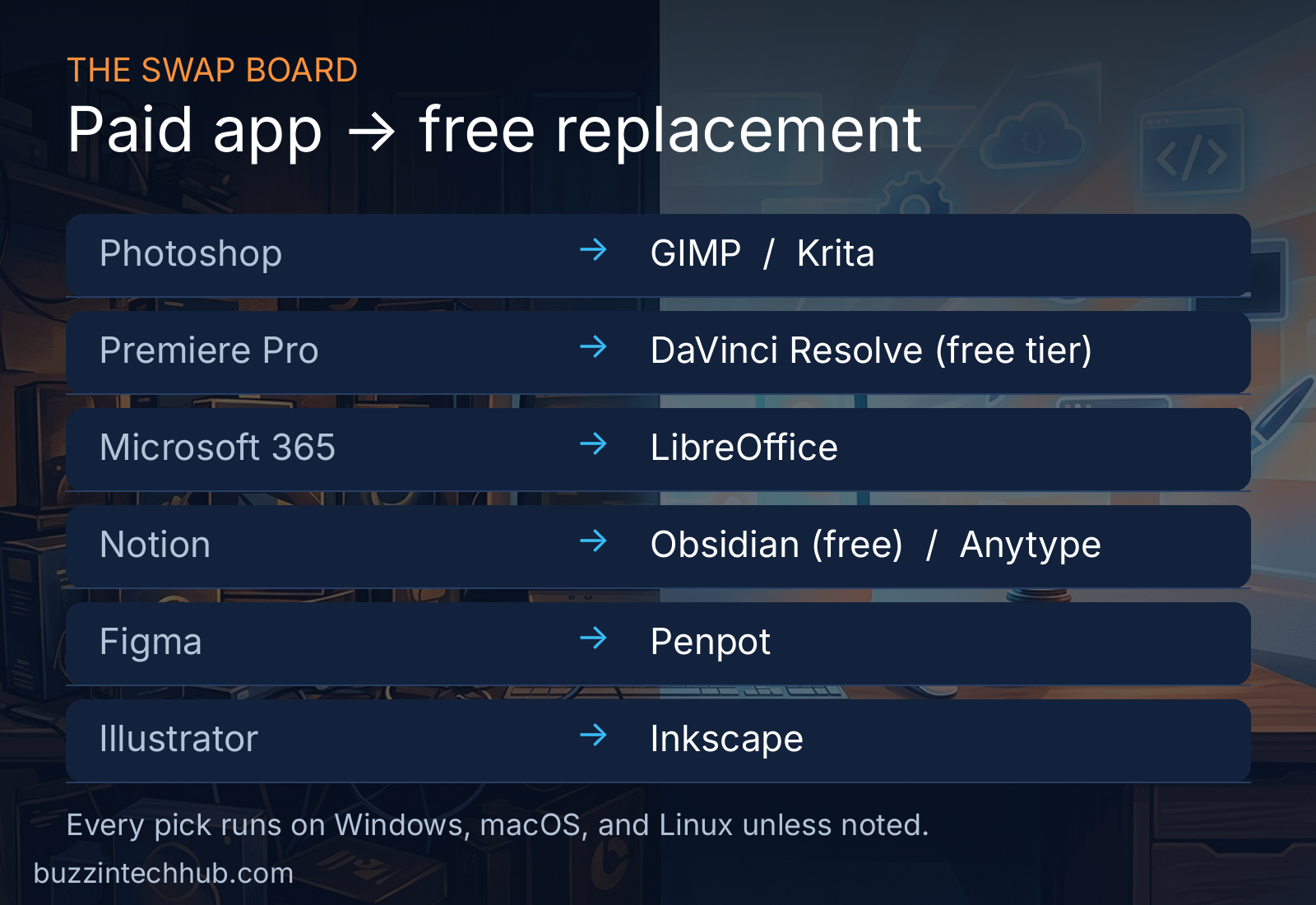
Photo editing: GIMP grew up, and Krita was already good
GIMP is the oldest war story in open source, and for years the honest review was the same: powerful, free, and organized like a hardware store where nothing has a label. Version 3 changed that. GIMP 3.2.6, released on September 10, 2026, is the release to download. The 3.2 line, which first shipped in March 2026, added Link Layers (the answer to Photoshop's Smart Objects) and proper Vector Layers, and the project has started early work on the GTK4 migration that will modernize the interface further.
There is a real caveat and you should hear it plainly. The 3.0 rewrite broke a large part of the old plugin ecosystem. G'MIC and many Resynthesizer functions are back in 3.2, but not everything made the trip. If your Photoshop workflow depends on a specific third-party plugin, check that its GIMP equivalent exists before you commit. For straight photo editing, retouching, compositing, and web graphics, GIMP 3.2 is the complete program.
New switchers have one trick worth knowing: PhotoGIMP, a community patch that rearranges GIMP's panels and shortcuts to look like Photoshop. It does not change what the program can do, but it removes the "where is everything" week from the learning curve.
If you draw rather than edit, Krita is the more interesting pick. It was built for illustrators and comic artists, and its brush engine is the reason many digital painters chose it over Photoshop years ago and never looked back. Between the two: GIMP for photos, Krita for painting.
Drawing, vectors, and interface design
Inkscape replaces Illustrator, and it does so without drama. The current stable line is 1.4.x (1.4.4 is the build packaged this month), and the 1.4 release from October 2024 brought the Shape Builder tool, a unified font browser, and import support for Affinity Designer files. If your vector work is logos, icons, diagrams, and print layouts, Inkscape covers it. The remaining gap is the deep Adobe ecosystem lock-in: files that rely on proprietary Illustrator effects or a studio pipeline built around Creative Cloud libraries. For independent work, that gap rarely matters.
The more surprising story is Penpot, the open-source answer to Figma. Design tools live or die on collaboration and file compatibility, and Penpot spent the last two years closing both gaps: native CSS Grid and Flexbox on the canvas, a real Figma importer, and developer inspection with no paid seat. Then came the news that changed how seriously the industry takes it. On July 21, 2026, Spain's Ministry for Digital Transformation invested 1.92 million euros in Kaleidos, the company behind Penpot, as part of a 6.9 million euro round through the Next Tech facility. The framing was explicit: European digital sovereignty, a domestic design platform that does not answer to a foreign vendor. When governments start writing checks, the "is this project going to survive" question answers itself.
Video: the free tier that embarrasses paid software
DaVinci Resolve is the strangest entry on this list, because it is not open source at all. It is a commercial product with a free tier so complete that it functions as the free alternative. The 2026 release (version 21) keeps the deal intact: no watermark, no export limits that matter, and a feature set that working colorists and editors use on paid jobs. It replaces Premiere Pro, which now runs about $55 a month as a single app, and it replaces it on Windows, macOS, and Linux alike. The paid Studio version is a $295 one-time purchase, which tells you everything about the two companies' philosophies: one rents you the tool forever, the other sells it to you once. If you want GPL code under the hood instead, Kdenlive 26.08.1 (released September 11, 2026) is the strongest fully open editor this year.
Photographers and 3D artists get their own paragraph
Lightroom's replacement is Darktable, and the version to grab is 5.6.1 from August 2026, which improved AI-assisted RAW processing and GPU stability. It is a proper RAW developer with non-destructive editing, tethered shooting, and print modules, and it reads the same camera files Lightroom does. Photographers who live in presets will need a week to rebuild their look, which is the only real cost.
Blender needs less introduction every year, but its 2026 funding sheet deserves a look because it explains why the program keeps accelerating. Blender 5.0 shipped in November 2025 with HDR and ACES pipelines and a reworked interface. Since then, Anthropic joined as a Corporate Patron at 240,000 euros a year, Dell joined the Gold tier in January (the first major Windows PC maker to do so), GPU startup Bolt Graphics committed 240,000 euros a year before shipping a single card, and Volkswagen funds the project at 120,000 euros a year. A 3D suite that replaces software costing thousands per seat, funded partly by the companies whose hardware it runs on, is the open-source model working exactly as designed.
The office suite: LibreOffice's quiet confidence
LibreOffice 26.8 arrived on August 26, 2026, and it is the release that makes the Microsoft 365 question simple for most households. The headline feature is Writer's new Paragraph Composer, which finally fixes the line-breaking behavior that made long documents look subtly wrong next to Word. The project also moved to calendar versioning (hence 26.8 instead of a 25.x number), ships in 120 languages, and counted 206 contributors on this release, 155 of them volunteers.
The more interesting line from the release was not a feature at all. The Document Foundation positioned 26.8 as having "no artificial intelligence": your documents are never sent to a remote service for processing. Whether you find that principled or stubborn, it is a genuine differentiator in 2026, when every commercial office suite pipes your writing through someone's cloud model. LibreOffice opens and saves Microsoft formats well enough for everyday documents, and for a home user or small business it removes a yearly bill entirely. The 26.2 branch goes end-of-life on November 30, 2026, so new installs should take the 26.8 line.
The alternative to the alternative is ONLYOFFICE, and it is the right call when document fidelity matters more than anything else. If you exchange complex Word files with clients daily and cannot afford a single broken table, ONLYOFFICE's compatibility with Microsoft formats is the best in the free world. Version 10.0 is due this autumn with four reworked apps, around fifty new features, a thousand bug fixes, and over thirty security improvements. The practical split: LibreOffice for most people, ONLYOFFICE for the person whose job depends on pixel-perfect .docx files.
Notes, wikis, and the second brain
Notion's free plan keeps shrinking, and its paid plan keeps mattering more. The local-first alternatives have never looked better. Obsidian is technically freeware rather than open source, but it belongs in this guide because it changed the economics of the category: free for commercial use since February 2025, with your notes stored as plain Markdown files on your own disk. Version 1.13.8 (August 2026) added a command-line interface and made Bases, its database views over Markdown files, a core plugin. Your notes remain readable in any text editor fifty years from now, which is more than you can say for any database-backed app.
Anytype is the fully open-source answer: local-first, typed objects instead of pages, encrypted sync, and an MCP server for the AI-assistant crowd. The project shipped 29 releases in 2026, which is either inspiring or exhausting depending on your temperament. AppFlowy (AGPL-licensed) and AFFiNE cover the same ground with different trade-offs, and Outline is worth a look if what you actually want is a team wiki rather than a personal notebook.
The decision here is about where your words live. If the idea of a company holding your decade of notes hostage to a pricing page bothers you, any of these ends the worry permanently.
Email, chat, and calls
Thunderbird 140 is the Outlook replacement, and it arrives with the best possible endorsement: a government finished migrating to it. In October 2025, the German state of Schleswig-Holstein completed the move of more than 40,000 mailboxes and over 100 million emails and calendar entries from Exchange and Outlook to Open-Xchange and Thunderbird. If a state government can move its entire mail system, your inbox will survive the afternoon it takes to import it. Thunderbird handles multiple accounts, calendars, and encryption without a subscription, and it does not scan your mail to sell ads.
For team chat, Mattermost 11.9.0 (July 2026) is the Slack alternative, with one licensing detail that matters. Use the Team Edition: MIT-licensed, unlimited message history, 250-user cap. The newer Entry Edition put older messages behind a paywall, which drew real community anger in late 2025, so download the right edition.
Video calls are the solved problem nobody talks about: Jitsi runs in a browser, needs no account for basic meetings, and costs nothing. It will not replace Zoom's webinar features or its enterprise admin panel, but for the daily standup and the family call, it is the rare switch with no downside at all.
Passwords, files, and the living room server
Bitwarden replaces 1Password and LastPass, and its 2026 story is about trust earned the hard way. When the company briefly moved its SDK to a restrictive license in late 2024, the community revolted, and Bitwarden responded by relicensing the SDK to GPLv3. That is how open-source accountability is supposed to work. The September 2026 update lets the server run rootless on a read-only filesystem, which matters if you self-host. Most self-hosters actually run Vaultwarden (version 1.36.0), an unofficial lightweight server written in Rust that works with the official Bitwarden apps and sips resources on a ten-dollar VPS.
Your files belong on Nextcloud if you want Dropbox-style sync without the monthly fee, and your photos belong on Immich if Google Photos' pricing stings. Neither needs much explanation: they sync, they share, they have phone apps, and the data sits on hardware you control.
The most satisfying switch on this list is the media server. Jellyfin v12 shipped in September 2026 (the project skipped version 11 entirely) with proper book support, multi-version episodes, big database speedups, and a new modern layout. It replaces Plex, and the timing could not be better: Plex now charges $7.99 a month or $749.99 for a lifetime pass after tripling the lifetime price in July 2026, and more than 36,000 Plex servers were sitting unpatched on critical vulnerabilities this month. Jellyfin is free, open source, and does not phone home about what you watch.
Two smaller swaps round out the picture. Plausible and Umami replace Google Analytics for site owners who would rather not feed the ad machine, and n8n's community edition replaces Zapier's $30 to $100 a month for automation workflows. None of these will change your life. All of them will shrink a bill.
The developer corner
Developers were the first to feel subscription fatigue, because the AI coding assistant became a second rent payment on top of everything else. Continue is the leading open-source Copilot-style extension for VS Code. Aider takes the terminal-first approach and lets you bring your own API keys, which keeps costs at raw token prices instead of a monthly seat. If you would rather skip the cloud entirely, Ollama runs Llama 3, DeepSeek, and Mistral models locally on your own machine, which replaces the per-seat ChatGPT Team or Claude subscription for a large class of everyday coding questions.
When whole governments do the math
Individual savings are persuasive, but the strongest evidence for the free software switch comes from organizations that published their numbers. The German state of Schleswig-Holstein is moving 30,000 employees off Microsoft software and onto open source, and it announced 15 million euros in annual savings starting in 2026 against a 9 million euro one-time migration investment. Payback in under a year, on the public record.
The French city of Toulouse moved 8,000 workstations to LibreOffice over eighteen months and reported 1.8 million euros in annual license savings against an 800,000 euro migration cost. The French Gendarmerie has run Ubuntu on more than 85,000 PCs since 2008, saving roughly 2 million euros a year in license fees according to Canonical's case study, with the estate growing past 100,000 workstations.
And the pipeline keeps filling. In January 2026, France ordered Microsoft Teams and Zoom replaced with the domestic Visio platform across 2.5 million civil servants by 2027, the largest digital-sovereignty move the country has announced. These are not hobbyists. They are finance ministries doing arithmetic.
The 30-day switch plan
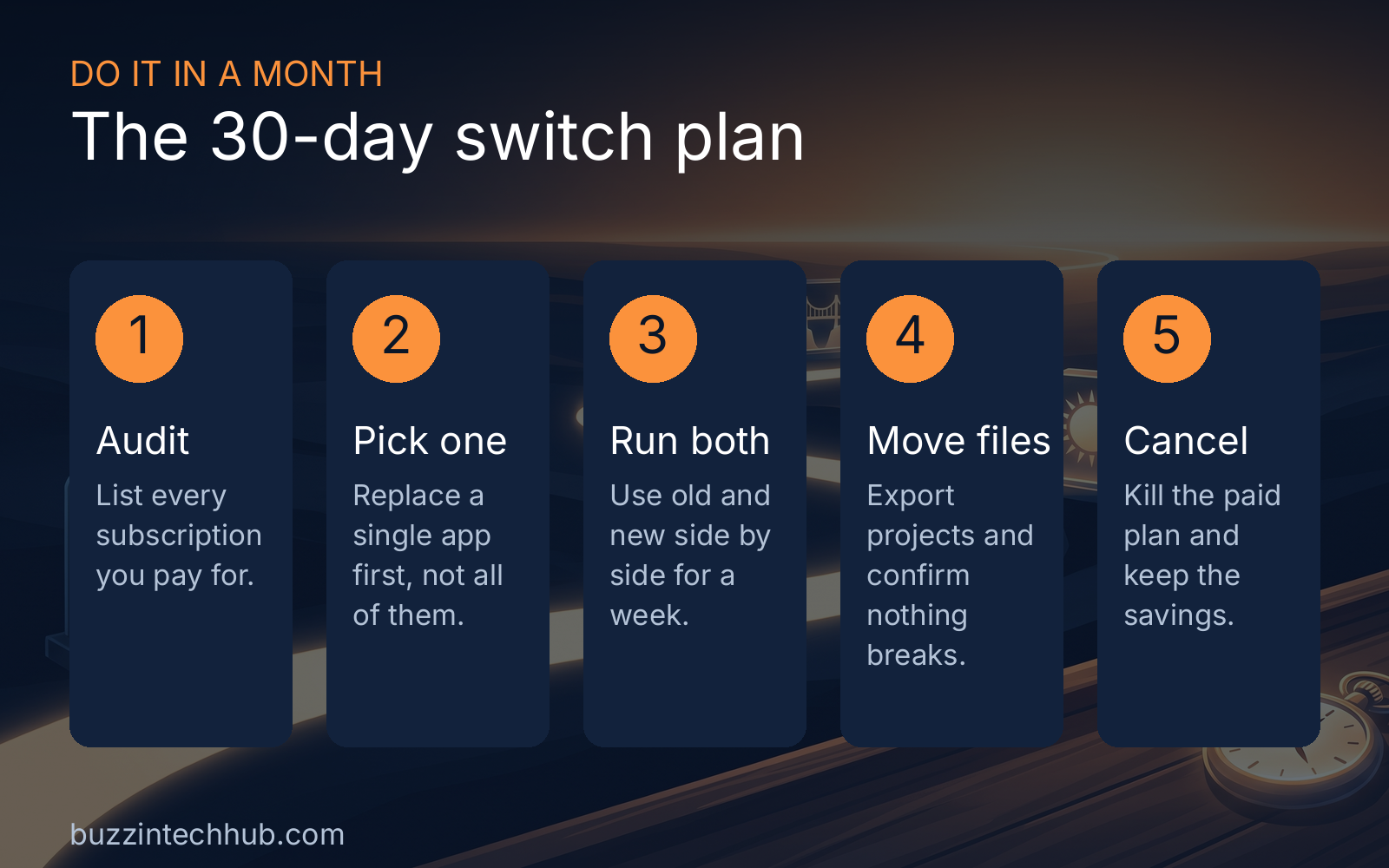
Here is the order of operations that works. Week one, audit: list every subscription you pay for, including the annual ones you forget about until the charge appears. Most people find two or three they forgot entirely, and cancelling those pays for the whole exercise.
Week two, pick one program to replace, and make it a low-stakes one. The note app or the password manager is ideal; the video editor you use for client work is not. Install the replacement, import your data, and run both side by side for a full week of real use.
Week three, migrate your files properly. Export projects from the old program, open them in the new one, and check that everything survived: formatting, layers, metadata, the works. This is the step people skip, and it is the step that causes every horror story.
Week four, cancel the paid plan. Not pause, not downgrade: cancel. Then take the money you were spending and do something better with it. A year of the average person's software subscriptions buys a very nice monitor, or a long weekend somewhere with no Wi-Fi.
The bill you will not miss
The software industry spent a decade training everyone to rent tools by the month, and for a while the convenience argument won. The tools were better, the syncing was magic, and ten dollars here and there felt like nothing. But the prices kept rising, the free tiers kept shrinking, and the programs you could once buy started phoning home for permission to open.
Open source spent that same decade getting good. Not good "for free software," but good in the absolute sense: GIMP 3.2 edits photos professionally, LibreOffice 26.8 handles real documents, Jellyfin v12 runs the living room, and governments publish eight-figure savings from switching. The remaining gaps are narrow and specific, mostly plugins and proprietary file formats, and they shrink every year.
Start with one program this weekend. Run the old and the new side by side. Cancel something. The money was always yours; the software is finally catching up.
More from Buzzin Tech Hub
Frequently asked questions
What is the best free alternative to Photoshop in 2026?
GIMP 3.2.6 for photo editing, retouching, and compositing. If you draw or paint rather than edit photos, Krita is the better pick: its brush engine is the reason many digital painters left Photoshop years ago.
Can LibreOffice really replace Microsoft 365?
For most households and small businesses, yes. LibreOffice 26.8 fixed Writer's long-standing line-breaking quirks and opens Microsoft formats reliably. If your job depends on pixel-perfect .docx exchange with clients every day, use ONLYOFFICE instead: its Microsoft format fidelity is the best in the free world.
Is DaVinci Resolve actually free?
The free tier is, and it is complete enough for professional work: no watermark and no export limits that matter. It replaces Premiere Pro on Windows, macOS, and Linux. The paid Studio version is a $295 one-time purchase, not a subscription.
What is the best free Plex alternative?
Jellyfin v12, released September 2026. It is fully open source, costs nothing, and does not report your viewing habits anywhere. The timing is kind: Plex tripled its lifetime pass to $749.99 in July 2026.
Which free note app replaces Notion?
Obsidian stores your notes as plain Markdown files on your own disk and is free for commercial use since February 2025. Anytype is the fully open-source answer, with local-first sync and encryption built in.
How do I switch without breaking my workflow?
One program at a time. Install the replacement, run it side by side with the paid app for a full week of real work, migrate your files and confirm nothing broke, then cancel the subscription. Never uninstall the old tool on a deadline week.
Is open-source software safe for business use?
Governments publish their numbers: Schleswig-Holstein expects 15 million euros in annual savings from its Microsoft-to-open-source migration, Toulouse reported 1.8 million euros a year moving 8,000 workstations to LibreOffice, and the French Gendarmerie has run Ubuntu on 85,000+ PCs since 2008.
More from Buzzin Tech Hub
If the server side of your setup needs the same treatment, read our companion piece on the five open-source tools that replace $1,200 a month in proprietary SaaS: companion piece on the five open-source tools that replace $1,200 a month in proprietary SaaS. Developers switching to local AI tooling should also see how Python 3.14's free-threaded runtime changes the performance math: how Python 3.14's free-threaded runtime changes the performance math. Tomorrow's post is the Sunday tech market update. Browse everything at buzzintechhub.com/blog.php.