Software update season runs in waves, and this week the second wave arrived. The pattern is hard to miss: old software is retiring while new software moves into its place. The Pixel 6, released in October 2021, likely received its final update this week after five years of support. Windows 11 24H2 reaches the end of its updates on October 13, just five days from now. And filling the gap: Windows 11 26H2 rolling out with its most visible interface change in years, Apple seeding the 27.2 betas across the iPhone, iPad, Mac, Apple TV, and Watch, Google publishing the first beta of Android 17 QPR3, and Samsung pushing its October security patch across the Galaxy line.
This is the follow-up to last week's October update season roundup, which covered the launches of iOS 27 and macOS Golden Gate. This week's story is what comes next: the betas that preview the next round of features, the patches that close this month's holes, and the deadlines you should not sleep through.
Windows 11 26H2: the taskbar finally moves again
Windows 11's next annual update, version 26H2, is rolling out, and its headline change is something users asked for since 2021. The taskbar can now move to any edge of the screen again: top, bottom, left, or right. It can also switch to a smaller layout with reduced icon sizes. This is a restoration more than an invention. Windows 10 and every version before it let you drag the taskbar where you wanted it, and Windows 11's redesigned shell took that away at launch. Five years later, it is back. Microsoft adjusts the rest of the interface around the position too: put the taskbar along the top edge and the Start menu and search panel open downward instead of upward.
The Start menu gets a similar treatment. It can be resized and customized more easily than before. Windows Search gets a clean, distraction-free Home view, better results filtering, and the option to turn off web and Microsoft Store suggestions, which is the change many power users wanted most.
Under the surface, 26H2 pulls together pieces Microsoft has been shipping through cumulative updates for months. Point-in-Time Restore is a new recovery option that rolls a PC back to an earlier state when something goes wrong. Administrator Protection separates admin privileges from the everyday account, so malware has a harder time making system-wide changes. Windows Hello gains Enhanced Sign-in Security support for third-party fingerprint readers. Windows settings backup is now switched on by default, which makes moving to a new PC less of a chore. File Explorer gets AI actions, multi-app camera support arrives, and new archive formats are supported.
Here is the part Microsoft barely mentioned, and it may be the most noticeable change of all. Users report that PCs on 26H2 use considerably less memory. One three-year-old laptop with 16 GB of RAM reportedly used about 2 GB less after the upgrade, and some users on Reddit report reductions approaching 3 GB. The biggest differences show up while machines sit idle, though users also report snappier behavior with apps running. That comes from user reports; Microsoft has published no official figures, and the effect will vary across hardware. If it holds across a wide range of machines, it matters most on PCs with 8 GB or 16 GB of memory, where background Windows processes eat a real share of what is available.
The upgrade itself should be painless for most PCs. 26H2 ships as an enablement package on the same "Germanium" platform that underpins 24H2 and 25H2, so PCs already on either of those versions complete the upgrade in a few minutes with a single reboot. Support runs 24 months on Home and Pro editions, and 36 months on Enterprise and Education.
The urgency belongs to 24H2 users. Windows 11 version 24H2 Home and Pro reach the end of updates on October 13, 2026. After that date, those PCs stop receiving security updates until they move to a newer version. If your PC still runs 24H2, this week is the time to move. Open Settings, Windows Update, turn on "Get the latest updates as soon as they are available," and check for updates.
October Patch Tuesday: what KB5124010 changes
The October security update for Windows 11, KB5124010, landed alongside the 26H2 push, and it carries the month's fixes for 24H2 and 25H2 machines. File Explorer gets a handful of practical refinements. The preview pane can now preview downloaded HTML files after you acknowledge a warning, while PDFs and other files preview automatically. File Explorer Home remembers which sections you expanded or collapsed, so the layout stays the way you left it. Cloud-file thumbnails got more reliable in the Details pane, and an old annoyance is fixed: the address bar no longer clears itself when you click near its right edge.
The rest of the list is small quality-of-life work. Emoji 17.0 support arrives. A new Tips widget appears on the Widgets board and the Lock screen. The Copilot key can now be remapped to Right Ctrl or the Context menu key. Precision touchpad gestures gain more controls, and there is an option to automatically maximize apps. The Windows Recovery Environment gets Wi-Fi support, which matters on the day your network driver is the thing that broke. Fixes cover File History (including the false "Reconnect your drive" message), the Camera app, and System Monitor.
Two caveats worth knowing. Microsoft rolls features out gradually with its Controlled Feature Rollout system, so an announced feature may take days or weeks to reach your PC even after the update installs. Some features also arrive later in Europe because of regulatory requirements. The two known issues with this update: some domain-joined devices may lose their secure trust relationship with on-premises Active Directory, blocking interactive sign-in with valid domain credentials, and USB Audio Class 1.0 devices may fail to start or produce audio, including Code 10 errors. If you depend on either, hold the update until Microsoft clears them.
Apple's 27.2 betas: the next wave takes shape
Apple seeded the second public betas of iOS 27.2, iPadOS 27.2, macOS Golden Gate 27.2, tvOS 27.2, and watchOS 27.2 on October 6, one day after the third developer betas. The pace is quick: this is a point release moving faster than usual, and the contents show why.
iOS 27.2 is testing a redesigned Health app, the one Apple showed at its September iPhone event. It adds Insights and Longevity tabs and a Health Age feature that estimates your fitness age from your metrics. One detail matters for expectations: Apple's own developer notes say the redesigned app is being tested in this beta but will not ship in the public iOS 27.2 release. It arrives later in the year. The beta also brings Siri AI to French, Japanese, Korean, Portuguese, and Spanish, puts Apple TV app profiles on the iPhone version of the app (until now they lived only on tvOS), and adds a small humane touch: if an anniversary date is saved in Contacts, the phone reminds you when you call your significant other.
On the Mac, macOS Golden Gate 27.2 brings the expanded Siri AI languages and a small but practical redesign: new brightness and volume sliders. MacRumors expects the release toward the end of October. There is also a quieter signal inside the beta. Code in 27.2 references new touch-specific gestures in Safari, Notes, Photos, and Quick Look, possible preparation for the rumored OLED touchscreen MacBook, reportedly called the MacBook Ultra. The gesture recognizers cover touch dwell in Photos, touch press in Notes, a touch sentinel in Safari, and touch dragging in Quick Look. The code may simply extend Sidecar's touch features, since Golden Gate already brought full touch input to Sidecar. Still, the rumor attached to it is specific: a thinner, lighter MacBook with an OLED touchscreen, a Dynamic Island, and M5 Pro and M5 Max chips, possibly launching as soon as late 2026. Either way, Apple is clearly making its Mac apps more touch-aware.
Two missing Apple Intelligence features may also return in 27.2. Apple quietly pulled both before Golden Gate shipped publicly. One is Suggestions in Messages, which reads conversation context and offers actions like inserting a photo when a friend asks for one or adding an event to Calendar when someone sends an invitation. The other is a Safari password feature that detects weak or compromised saved passwords and updates them automatically. Apple promised both would return in a future update, and the fast pace of the 27.2 betas suggests this is the one.
watchOS 27.2 is testing the new Health app as well, with a readiness score calculated from data on the new Apple Watch Series 12 and Ultra 4 models. Registered public beta testers can install each beta from the Software Update section of the Settings app after enrolling on Apple's beta site.
Pixel: the October patch and the end of the Pixel 6
Google began rolling out the October 2026 monthly update on October 6 to 25 Pixel models running Android 17: everything from the Pixel 6a and Pixel 7 family through the Pixel 11 line, plus the Pixel Tablet and Pixel Fold. The update carries the month's Android security patch level and three bug fixes. Details live on Google's Pixel Update Bulletin. The rollout proceeds in phases over about a week, so the timing varies by device and carrier.
The story inside the story is the Pixel 6 and Pixel 6 Pro. Released in October 2021, the pair has reached the end of its five-year software support period, which makes this October 2026 update very likely their final one. Five years of monthly patches for a phone that launched with the first-generation Tensor chip is a respectable run, and it sets the bar Google's own later Pixels now exceed. If you still use a Pixel 6 or 6 Pro, the practical meaning is simple: after this month, newly discovered vulnerabilities in your phone will not get fixed. It is time to plan the replacement, not this year perhaps, but on a real timeline.
Developers and the curious get something else this week: Android 17 QPR3 Beta 1, the first preview of the quarterly release after the current one. It covers Pixel 6a through the Pixel 11 family, with build DP11.260918.006 on most models and DP11.260918.005 on the Pixel 11 devices. The release notes are a long bug-fix list: audio output that could not switch devices while apps played without media controls, apps crashing when starting a foreground service from a Quick Settings tile, icons with excessive spacing in the app menu, missing app previews in the recent apps screen, NFC service crashes after the first tag scan, freezes on fingerprint unlock, crashes when enabling the "eyes open" requirement in Face Unlock, and MediaPlayer crashes on non-ASCII audio tags. Beta software is beta software: install it on a spare device, not the phone you need at 8 a.m.
Samsung: the October patch goes global
Samsung is pushing its October 2026 update wider this week. The patch brings 83 security improvements in total, including four Samsung Semiconductor patches, and it is rolling out globally to the Galaxy Z Fold 8 and Z Fold 8 Ultra after starting in South Korea. Devices in Europe and India are picking up the AZIJ build. One footnote: the two foldables run Snapdragon 8 Elite series chips exclusively, so the four semiconductor-specific fixes do not apply to them. You can pull the update from Settings, then Software update, then Download and install. Samsung's monthly cadence on its latest foldables remains the best support the company offers, alongside the quarterly schedule for older models, and seamless updates mean the phone keeps working through the install with only a quick reboot at the end.
The beta program is moving too. The Galaxy A16 is getting One UI 9 Beta 2 and the Galaxy A55 is getting Beta 3, after the official One UI 9 rollout began in Korea and started expanding to other markets. The A16's second beta fixes fast charging that was not working, battery protection that could fail while the phone was powered off, a camera bug where the Quick setting icon appeared during timer captures, and updates the Photo Editor to a newer version. The A55's third beta centers on a Wi-Fi stability fix for more consistent ireless connectivity. For beta testers, these are refinement builds: fewer surprises, more polish.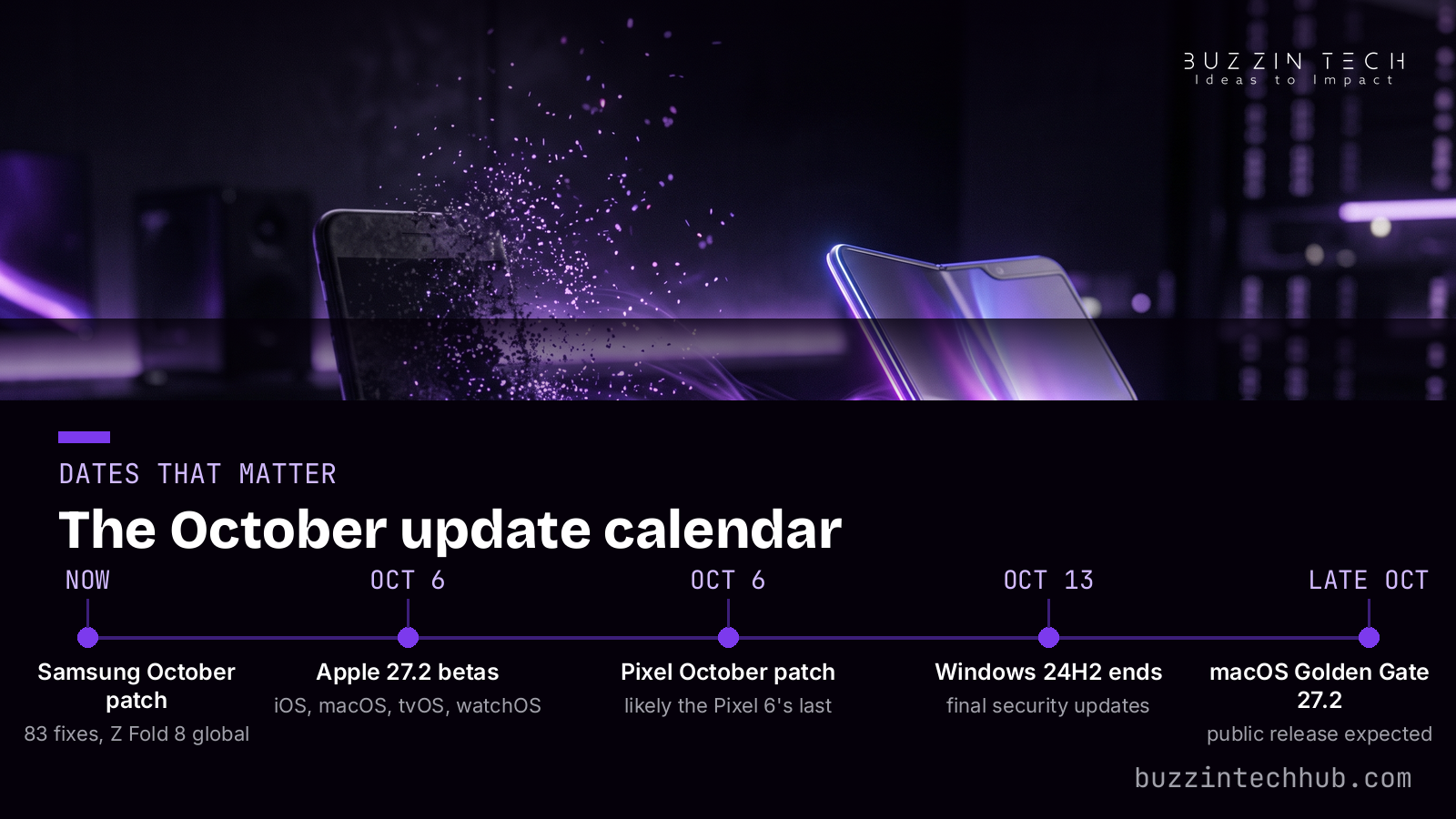
What to do this week
Updates are only useful if they land. Here is the short list for this week.
If you run Windows 11 24H2 on a Home or Pro PC, move before October 13. After that date there are no more security updates for your version, and an unpatched PC on the internet becomes a liability fast. The 26H2 upgrade is an enablement package, which means it installs fast and reboots once on supported machines. Flip on "Get the latest updates as soon as they are available" in Windows Update and check manually; the gradual rollout may take days to reach you.
If you use a Pixel 6 or 6 Pro, treat this month's patch as the end of the road. Your phone will keep working, but every new vulnerability from here on stays open. Set a replacement timeline and stick to it. Everyone else on a supported Pixel: the October update is a routine security patch with three small fixes. Install it when it arrives.
If you run betas, respect what they are. Apple's 27.2 public betas are unusually close to a real release, with the Mac version expected around the end of October, but the redesigned Health app is explicitly not shipping in this round. Android 17 QPR3 Beta 1 is an early developer preview. Beta software belongs on spare hardware.
And the standing rule behind all of it: back up before you update anything important. Windows has a new point-in-time restore to help, but the backup you made yourself is the one you control. Updates fail rarely and badly: a small share of users hit a bad migration, and a backup turns that into an annoyance instead of a disaster.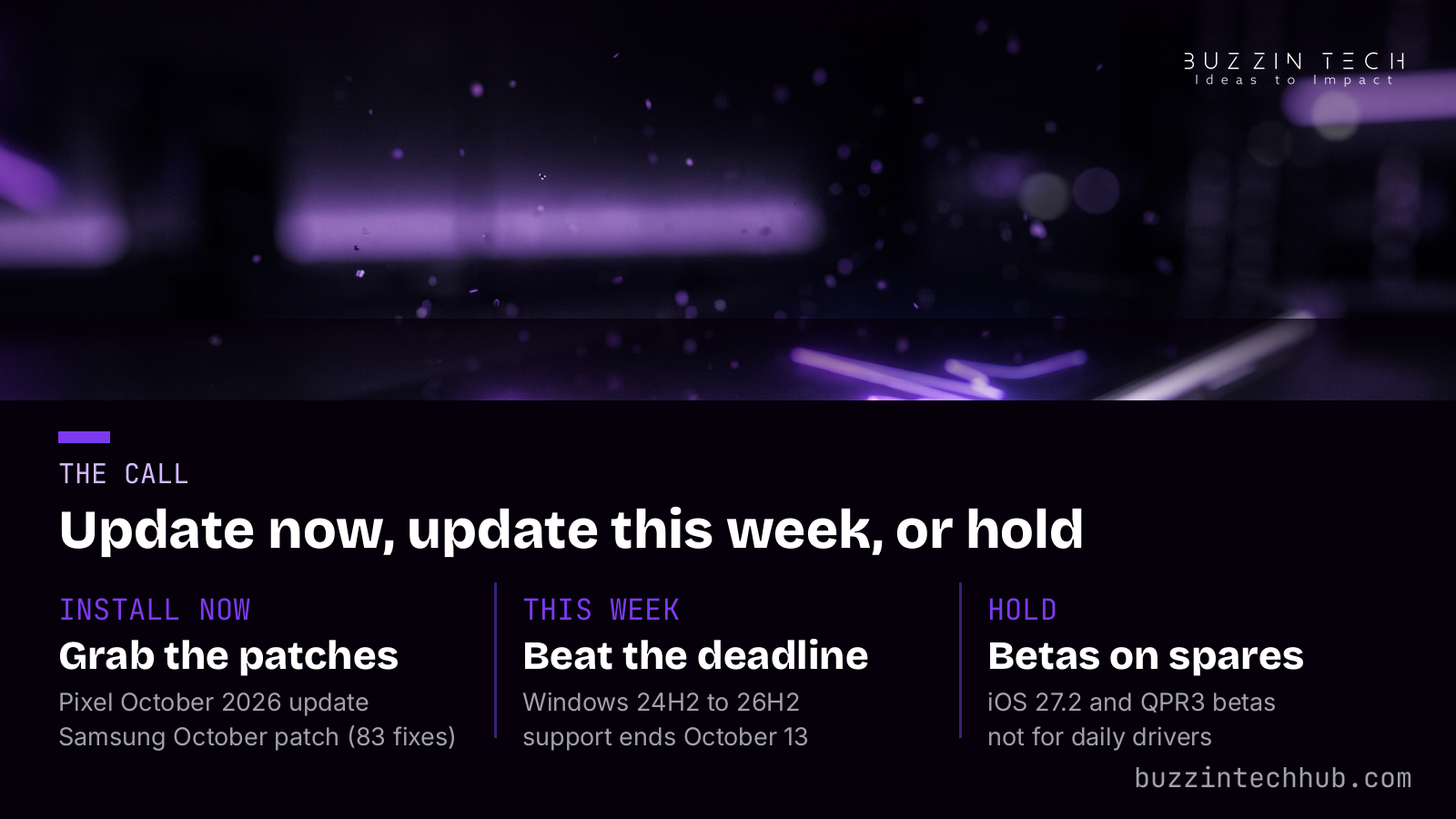
Close
This week reads like a changing of the guard. The Pixel 6 closes out five years, Windows 24H2 counts down its final five days, and the replacements are already here or nearly so: 26H2 on PCs, the 27.2 betas on Apple devices, QPR3 on Pixels, the October patch across Galaxy phones. The software industry does not pause between generations. It ships the next one while the last one is still warm, and the users who pay attention get the features early and the security fixes on time. Check your update screen this week. October is not done with you yet.
Frequently asked questions
When does Windows 11 24H2 stop getting updates?
Windows 11 version 24H2 Home and Pro reach the end of updates on October 13, 2026. After that date, Microsoft stops shipping security updates for those PCs until they move to a newer version. Enterprise and Education editions follow their own longer timelines.
What is new in Windows 11 26H2?
The taskbar can move to any screen edge and use a smaller layout, the Start menu is resizable and easier to customize, Windows Search gains a cleaner Home view with optional web and Store suggestions, and the update adds Point-in-Time Restore, Administrator Protection, stronger Windows Hello sign-in for third-party fingerprint readers, and settings backup switched on by default.
Is this really the last update for the Pixel 6?
Google has not used the word "final," but the Pixel 6 and Pixel 6 Pro reached the end of their five-year software support period with the October 2026 update, and sources covering the release expect it to be their last. No further monthly patches are promised.
When will iOS 27.2 and macOS Golden Gate 27.2 release to everyone?
Apple has not announced dates. The betas are moving quickly, with the second public betas seeded on October 6 and the third developer betas on October 5, and MacRumors expects macOS 27.2 toward the end of October. The redesigned Health app being tested in the betas will not ship in the public 27.2 release; Apple says it arrives later in the year.
Should I install the Android 17 QPR3 beta?
Only on a device you can afford to have misbehave. QPR3 Beta 1 is an early preview aimed at developers and testers, with a long list of known bugs being fixed. Keep your daily phone on the stable October patch.
How do I get the Windows 11 October update faster?
Open Settings, then Windows Update, turn on "Get the latest updates as soon as they are available," and click Check for Updates. Microsoft still rolls features out gradually, so some announced features may appear days after the update installs.
More from Buzzin Tech Hub
Up next in the rotation: Friday's new games roundup lands tomorrow. Browse every post so far at https://buzzintechhub.com/blog.php.