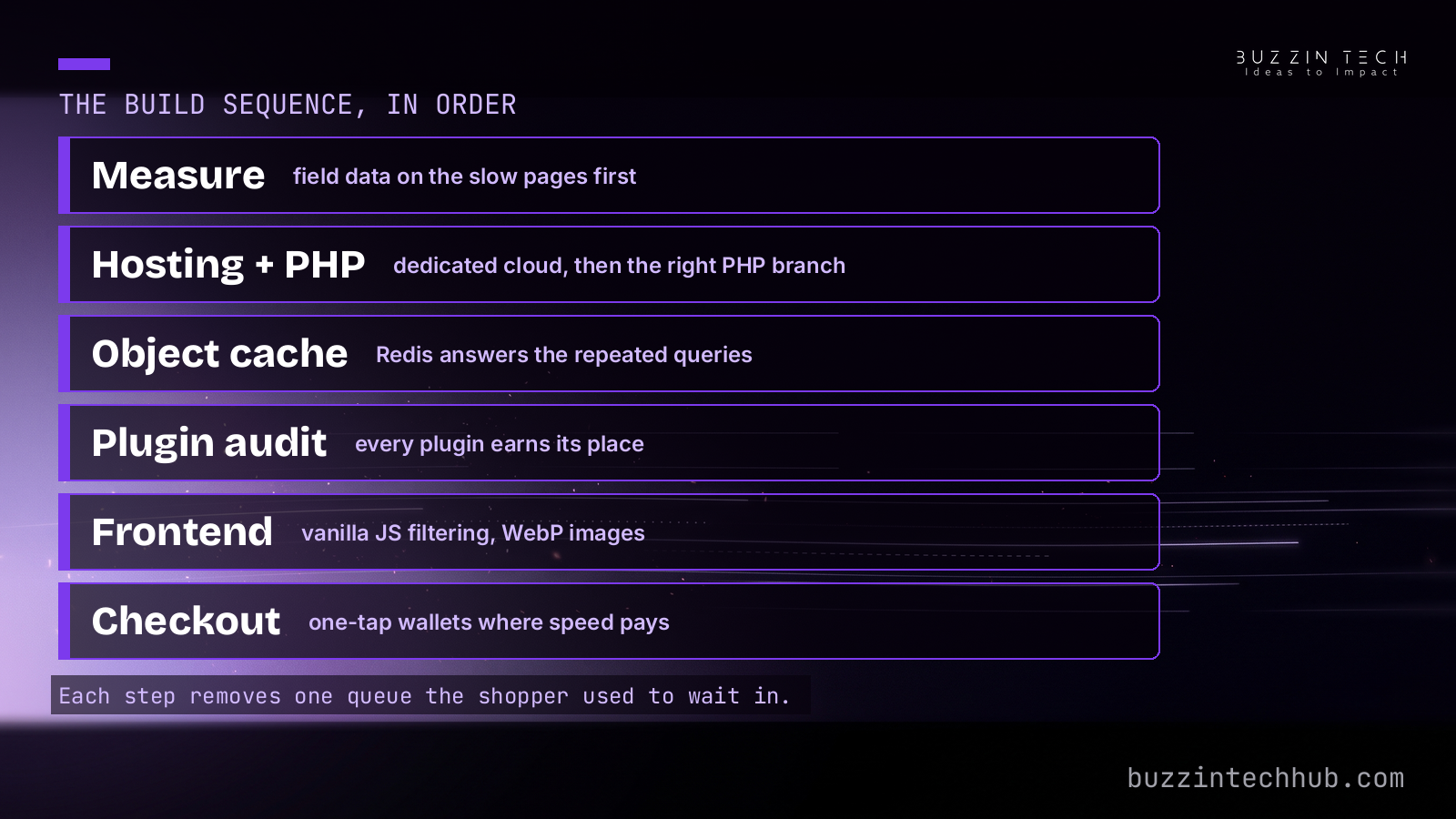
WooCommerce speed optimization fails when it starts with a plugin. A store that loads in 4 seconds does not need another cache layer on top of a slow stack. It needs the work done in the order the slowness was built: measure, hosting and PHP, object cache, plugin audit, frontend weight, then checkout.
TL;DR
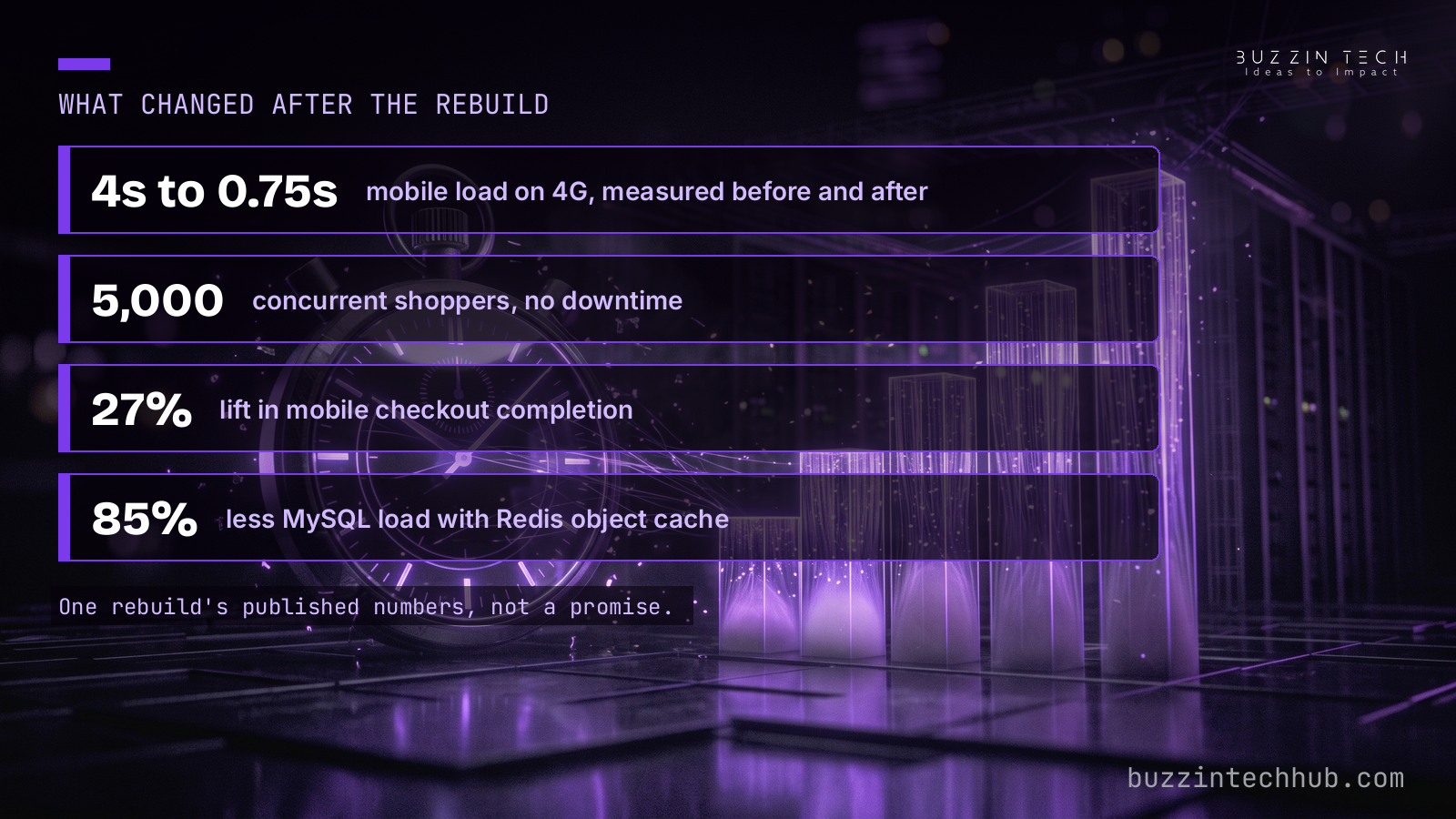
- A store we rebuilt loaded in 4 seconds and crashed during drops. The rebuild cut it to 0.75 seconds on mobile 4G.
- Speed work pays in sequence: measure slow pages, fix hosting and PHP, cache repeated queries, audit plugins, cut page weight.
- PHP 8.6.0 and WooCommerce 11.3.1 landed November 19, 2026. Patch your current PHP branch first, then plan 8.6 on staging.
- The same rebuild held 5,000 shoppers at once with no downtime, and checkout completion rose 27 percent.
Measure first: find the slow pages, not the slow site
A slow store is rarely slow everywhere. The product page that carries the traffic, the category page that carries the filters, and the checkout page that carries the sale usually fail in different ways, and a fix aimed at the whole site lands on none of them. Our web development work starts with field data on the pages that actually lose sales, read from real visits, before anything changes.
PageSpeed Insights shows what real visitors experience, through the Chrome User Experience Report, and the 75th percentile is the number to read. A lab test on a fast office connection flatters a slow site, so our builds are benchmarked on throttled 4G before launch. The number that comes out of that test is the baseline, and the baseline is what makes the result checkable later.
On the rebuild this post follows, the baseline was 4 seconds on mobile product pages. The store ran thousands of daily flash promotions, and traffic arrived in sudden spikes when a drop went live. Shared hosting could not carry the spike, and the shoppers who did get in waited 4 seconds for a product page. The 0.75-second result at the end of this post is worth quoting only because the 4-second start was measured first.
Measure the slow pages in this order: the product page, the category page, then checkout. Note the load time, the server response time, and the number of database queries on each. That list is the work plan for the rest of the sequence, and it decides what gets fixed first.
Hosting and PHP before plugins
Shared hosting splits one server among many sites, so a traffic spike on one store is a load the server never planned for. On the rebuild, the MySQL database hit CPU throttling limits within 90 seconds of a drop going live and returned 504 errors to shoppers. A cache plugin cannot fix that. The fix started underneath the store: a move to dedicated cloud architecture, so the spikes had capacity reserved for them instead of borrowed from neighbours.
The PHP version sits in the same layer. WooCommerce recommends PHP 8.3 or newer, and the plugin itself needs PHP 7.4 or newer on WordPress 7.0 or newer. The dates around those versions are what set the deadline. PHP 8.1 has received no security fixes since December 31, 2025. PHP 8.2 stops receiving them on December 31, 2026. WooCommerce 11.6, planned for February 2027, will require PHP 8.1 or newer, and 11.5 is the last release that runs on PHP 7.4 and 8.0.
November 19, 2026 gave every store two reasons to look at its PHP version at once. PHP 8.6.0 reached general availability that day, and the same day shipped security patches for the older branches: 8.5.13, 8.4.28, 8.3.37, and 8.2.36. A store does not have to move to 8.6 to get the fixes. The patch for its own branch is the first step, and the move to 8.6 is a separate decision, tested on staging.
Hosting cost belongs in the same decision. A store that rents managed hosting pays for the capacity it needs during the spike, not the average afternoon. Our comparison of what managed hosting costs on WooCommerce prices Kinsta's ecommerce plan at $50 a month and WP Engine Essential at $28 a month on annual billing, read on November 19, 2026. The hosting line is small next to the sales a crashed drop loses.
Object cache where it belongs
WooCommerce is database-heavy by design. Every product page, every filter click, and every price check is a query, and during a flash drop the same questions repeat thousands of times. On the rebuild, database profiling on peak traffic found that 92 percent of MySQL queries during a drop were identical repeated checks on inventory and prices for the same 20 featured items.
That is the exact problem Redis object caching solves. Redis keeps the answers to repeated database queries in memory, so the store serves them without asking the database again. The rebuild stored WooCommerce session tokens and product transients in Redis, and MySQL load fell by over 85 percent during peak promotions. Visitors read catalogue data from memory in under 2 milliseconds.
Page cache alone does not do this work. A page cache serves a stored copy of a page, and it helps, but it does not answer the repeated database questions behind a logged-in cart or a filtered catalogue. Object cache sits in front of the database, and page cache sits in front of the page. The rebuild ran both, in a pipeline that reads Cloudflare edge CDN, then Nginx microcaching, then Redis object cache, then MySQL 8.
The case study record for this rebuild sits on our projects page, with the full stack and the published numbers.
The plugin audit: every plugin earns its place
WordPress plugins are the easiest weight to add and the hardest to see. Each one loads code, runs queries, and adds scripts to pages that never use it. The audit is simple to run and easy to skip: list every plugin, measure what each one adds to the slow pages, and remove or replace the ones that cost more than they give.
On the rebuild, the catalogue filter was the plugin doing the most damage. Heavy faceted filter plugins ran every filter click back to the server as a fresh database query, and during a drop each click joined a queue that was already full. We rebuilt the filtering in lightweight vanilla JavaScript, so filtering happens on the shopper's device instead of waiting on the server. Initial script execution time fell 65 percent.
The rule we apply is plain: a plugin stays when the page it serves is faster with it than without it. A filter plugin that slows the catalogue, a slider plugin that loads on every page, and a chat widget that adds half a second to first paint each get the same question. The ones that cannot answer it come out. The rebuild removed the heavy plugins and kept the store's own code doing the work the plugins used to do.
Count the stack the same way you count the bill. Twelve plugins are twelve things to update, twelve things that can conflict, and twelve things that can break checkout on an update day. A short stack is easier to keep fast and easier to keep safe, and the audit is the step that keeps it short.
Frontend weight: the filter rebuild and the images
Frontend weight comes after the server work because the server decides whether the browser ever gets the page. Once the server answers fast, the page itself has to stay light. The filter rebuild is the example: less code to load, fewer queries per click, and a catalogue that stays fast while the crowd is at its largest.
Images are the second half of the frontend. Product photography is usually the heaviest part of a product page, and it is also the part the shopper sees first. The rebuild ran an automated WebP conversion pipeline that cut product gallery weight by up to 70 percent with no visible loss. Format, sizing, and responsive variants come first, so a phone never downloads a desktop image, and compression comes after that.
Third-party scripts get a budget of their own. Every analytics tag, chat widget, and heatmap tool has a cost in load time, and we measure it before it ships. The ones that do not earn their weight get cut. A script that breaks the budget fails the build, so it gets a decision instead of a quiet merge. Our post on the strip-out order sets out the same sequence for the frontend half of the stack.
The order is the point. Image work on a store whose server takes 4 seconds to answer changes nothing the shopper can feel. Do the server work first, then the script work, then the images, and the image work finishes the job instead of starting it.
Checkout last, because that is where speed pays
Checkout is the last step in the sequence because it is the step where speed turns into money. A fast product page that leads to a slow checkout still loses the sale at the last click. On the rebuild, mobile checkout completion rose 27 percent after the rebuild, and the store held 5,000 concurrent shoppers with no downtime during the next drops.
Part of that lift came from the checkout itself. The rebuild put one-tap mobile wallets, Apple Pay, Google Pay, and local digital wallets, directly on product pages, so shoppers could skip the multi-step cart. Fewer steps, fewer waits, fewer chances to leave.
The other half of the checkout fix is tracking. Browser pixels lose purchases to ad blockers and browser limits, so the store's own records and its ad platforms disagreed about what sold. We moved purchase events to the server with Meta Conversions API and Google server-side tagging, so the platforms see the purchases the store actually took. Server-side tracking leaves load time alone. It fixes the numbers behind the sale, so ad spend follows real buyers instead of guesses.
The full numbers sit in the case study: 0.75 seconds on mobile 4G, 5,000 concurrent shoppers, no downtime, and a 27 percent lift in mobile checkout completion. None of the three numbers stands alone. A fast page on a store that crashes still loses the sale, and a fast, stable store with broken tracking still spends its ad budget blind.
This week's upgrade order: patch, stage, then plan 8.6
Two releases landed on November 19, 2026, and they set the upgrade order for this week. PHP 8.6.0 reached general availability, with partial function application, a clamp() function, a Time\Duration class, a polling API, and default values for readonly properties. PHP 8.6 gets active support until December 31, 2028 and security fixes until December 31, 2030.
The same day, WooCommerce 11.3.1 shipped as a security release, with fixes across checkout, coupons, customer accounts, store permissions, and data handling, and a database update attached. WooCommerce asks stores to update promptly. Version 11.3.0 shipped on November 11, 2026, so 11.3.1 is a patch on a release that is eight days old.
11.3.1 carries changes to test on staging before production. Credentialed cross-origin Store API requests now need an origin WordPress allows, so a headless storefront on another domain can see CORS errors until its origin is allowlisted. The legacy wc-admin options endpoint now requires the manage_woocommerce capability, which can break integrations that use custom order-only roles. A new My Account email-confirmation template, myaccount/form-confirm-email.php, is one for themes that override WooCommerce templates to review.
PHP 8.6 needs the same staging treatment. A static scan re-run against the final 8.6.0 release still found deprecation notices in WooCommerce 11.3.0, four of them, one in a bundled library, and 39 of the top 100 WordPress plugins still carry at least one. Deprecations do not break a site on release day, but they fill logs, and they are the reason to test the move on staging before it touches production.
The order for this week is short. Back up the store, including today's orders. Patch the PHP branch the store already runs: 8.2.36, 8.3.37, 8.4.28, or 8.5.13, all released November 19, 2026. Update WooCommerce to 11.3.1 on staging, run the database update it asks for, place a test order that applies a coupon and changes the shipping address, and check My Account and an order tracking link. Then plan PHP 8.6 on staging, with the February 2027 floor in view: WooCommerce 11.6 will require PHP 8.1 or newer, and PHP 8.2 stops getting security fixes on December 31, 2026.
Do not upgrade PHP for speed. No published benchmark ties PHP 8.6 to a WooCommerce speed gain as of November 2026, and the upgrade case is compatibility and lifecycle, not load time. The speed work is the sequence above, and the version work is the maintenance that keeps the fast store safe.
Does your busiest hour break your store?
If your biggest crowd is the one your store handles worst, the fix starts underneath it. We run the audit that finds why, then rebuild in the order above.
See how we approach WooCommerce performance builds
Frequently asked questions
What is the fastest way to speed up a WooCommerce store?
Measure the slow pages first, then fix hosting and PHP, add object caching, audit plugins, and cut frontend weight, in that order. A rebuild we ran in that sequence cut mobile load from 4 seconds to 0.75 seconds on mobile 4G. A cache plugin on top of a slow stack does not do the same work.
Does PHP 8.6 make WooCommerce faster?
No published benchmark ties PHP 8.6 to a WooCommerce speed gain as of November 2026, so do not upgrade for speed alone. PHP 8.6.0 reached general availability on November 19, 2026, with partial function application, clamp(), a Duration class, and a polling API. The upgrade case is compatibility and lifecycle: PHP 8.2 stops getting security fixes on December 31, 2026.
Should I update to WooCommerce 11.3.1 now?
Yes, on staging first. WooCommerce 11.3.1 is a security release from November 19, 2026, covering checkout, coupons, customer accounts, and API permissions, and it runs a database update. Test headless storefronts and custom order-only roles before production: credentialed cross-origin Store API requests now need an allowed origin, and the legacy wc-admin options endpoint now needs the manage_woocommerce capability.
What PHP version should a WooCommerce store run?
PHP 8.3 or newer, which is what WooCommerce recommends. WooCommerce 11.6, planned for February 2027, will require PHP 8.1 or newer, and 11.5 is the last release for PHP 7.4 and 8.0. PHP 8.1 already gets no security fixes, and PHP 8.2 stops getting them on December 31, 2026.
What does Redis object caching do for WooCommerce?
Redis keeps the answers to repeated database queries in memory, so the store serves them without asking the database again. On a store we rebuilt, 92 percent of MySQL queries during flash drops were identical repeated checks on the same 20 items, and Redis cut MySQL load by over 85 percent.
Why fix checkout last in a speed rebuild?
Checkout is where speed pays, not where it starts. A rebuild we ran cut mobile load from 4 seconds to 0.75 seconds and held 5,000 shoppers at once, and mobile checkout completion rose 27 percent. Fix the pages that feed checkout first, then shorten checkout itself with one-tap wallets.